
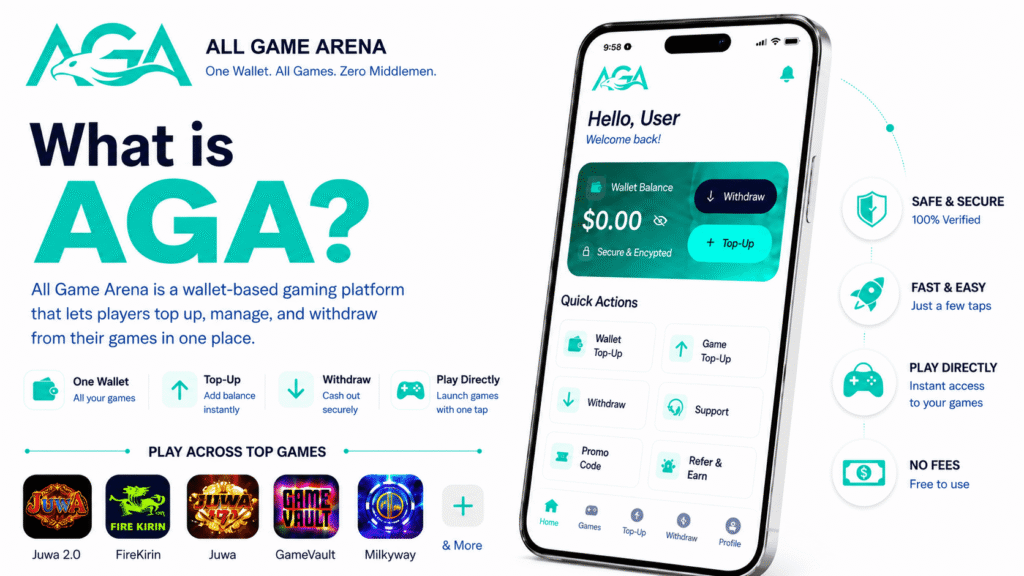
Tired of messaging unreliable agents on Facebook just to top up your favorite sweepstakes games? All Game Arena (AGA) cuts the middleman out entirely by providing a secure, 24/7 self-serve wallet for top sweepstakes platforms like Juwa, Fire Kirin, Game Vault, Milky Way, and Orion Stars. With AGA, you can top up your account, play your favorite titles, and cash out your winnings entirely on your own schedule.
This comprehensive guide covers everything you need to know: how to download and install the AGA app on Android and iPhone, how the unified wallet system works, step-by-step instructions for deposits and withdrawals, and how to maximize your rewards using promo codes and the Refer & Earn program.
| Quick Answer: All Game Arena (AGA) is a free, self-serve gaming wallet and portal designed for sweepstakes-style games like Juwa, Juwa 2.0, Fire Kirin, Game Vault, Milky Way, and Orion Stars. It allows you to fund one master wallet via Cash App or Chime, load credits into any supported game in seconds, and make independent withdrawals 24/7 – completely eliminating third-party Facebook or Telegram agents. AGA operates as a payment-assistance service and unified dashboard, not as a game software developer. |
What Is All Game Arena?
All Game Arena, AGA, is an automated, self-serve gaming wallet and launch portal built for the modern sweepstakes player. Instead of managing separate cash transactions with multiple, unverified social media agents for every different game you play, AGA provides a single, unified dashboard. You load funds into one master digital wallet inside the AGA app and route those credits directly into your chosen game software within seconds.
Before diving into the setup, it is helpful to clarify a few key structural details:
-
AGA is a Payment Gateway, Not a Game Operator: The platform does not host or own titles like Juwa or Fire Kirin. Those are independent external game suites. AGA simply handles your secure wallet balances, automated top-ups, and payout distributions.
-
100% Free Platform Fees: Setting up an account is free. AGA charges zero sign-up fees, zero deposit fees, and zero processing fees on standard withdrawals.
-
Cross-Platform Access: The system runs natively via a downloadable Android APK file and an optimized web application at the official website of All Game Arena, which serves as the primary gateway for iOS users.
-
24/7 Automated Withdrawals: You can submit cash-out requests at any time of day or night. Processing speeds depend strictly on your selected payout network and automated fraud-prevention audits.
-
Growing Player Base: Over 1,000 active players across the United States have already migrated from traditional social-agent networks to AGA’s self-serve dashboard.
The Old Facebook Agent Model vs. The Automated AGA Model
Here’s the difference at a glance:
| What you used to do | How AGA does it |
| Wait for an agent to reply on Facebook or Telegram | Sign up yourself in under a minute |
| Send Cash App to a stranger’s tag and hope it posts | Top up through an automated cashier; credits post instantly |
| Manage a different login for every game | One unified wallet feeds every game |
| Cash out only when your agent is awake | Self-serve withdrawals, available 24/7 |
| No transaction history or balance visibility | Everything visible in-app: balance, history, status |
If you’ve ever had an agent ghost you mid-cashout, the change here is obvious: your money lives in your account, not in someone else’s DMs.
Supported Games
AGA integrates seamlessly with the most popular, high-traffic sweepstakes-style gaming suites in the U.S. market:
- Juwa: Classic, high-energy arcade and fish-table gaming software.
- Juwa 2.0: Next-generation arcade suites optimized for self-serve account structures.
- Fire Kirin: The industry-standard fish hunting simulator alongside classic digital slots.
- Game Vault: A multi-game arcade aggregator featuring premium slot algorithms.
- Milky Way: A cosmic-themed fish game portal with unique skill-based mechanics.
- Orion Stars: Popular community-driven slot machines and rapid-fire fish hunt rooms.
The AGA catalog expands dynamically based on user demand.
How to Download and Install All Game Arena
Because AGA operates an independent real-money sweepstakes wallet ecosystem, the mobile software is distributed directly through its official security-vetted portal through the official site of AGA rather than the standard Google Play Store or Apple App Store.
| Is it safe to install outside the app stores? Yes. AGA runs only over HTTPS (encrypted end to end) and uses sandboxed credentials, so each game login is isolated and your master password is never shared. Bypassing the App Store doesn’t mean bypassing security; just be sure you only ever download from the official website. |
How to Install the All Game Arena APK on Android?
- Launch your mobile web browser and navigate to the official portal of All Game Arena.
-
Tap the Download for Android button to download the latest, verified APK installation file.
-
If your device prompts a security warning, open your device’s Settings -> Security and toggle on “Install from Unknown Sources” for your browser.
-
After you toggle on the installation from unknown sources, tap Install.
-
Once complete, open the application from your app drawer and proceed to account registration.
If you have never sideloaded an Android app before, the site has a step-by-step install guide at the official site of AGA.
How to Install All Game Arena (AGA) on iOS?
While Apple’s operating system environment prevents direct external APK installations, AGA utilizes an advanced Progressive Web App (PWA) framework that mimics a native iOS application perfectly.
-
Open the native Safari browser on your iPhone or iPad (this configuration process must be done through Safari, not Google Chrome).
-
Go to the web application URL of All Game Arena.
-
Tap the Share icon located on your Safari toolbar (the square icon featuring an upward-pointing arrow).
-
Scroll through the available sharing options and select Add to Home Screen.
-
Confirm by tapping Add in the top-right corner of the confirmation menu.
An AGA shortcut icon will now appear directly alongside your other native mobile applications. Launching this icon runs the wallet system in an immersive, full-screen mode.
How to Create Your Account on All Game Arena?
Setting up your account takes less than a minute. When filling out the standard registration screen, ensure you input accurate information to prevent identity mismatches during later withdrawal cash-outs.
| Field | Required | Notes |
| Full Name | Yes | Used for verification and withdrawals |
| Username | Yes | Your AGA handle |
| Password | Yes | Use a strong, unique password (this protects real money) |
| Confirm Password | Yes | Must match exactly |
| Email Address | Yes | For receipts, resets, and support |
| Mobile Phone | Yes | For recovery and notifications |
| Referral Code | Optional (recommended) | If a friend invited you, drop their code here so you both get a bonus |
| Terms & Privacy Policy | Yes | Tick to confirm |
Hit Create Account and you’re in.
| Tip: If you can find a referral code or link before signing up, use it. Codes typically can’t be added after the registration, and both you and your inviter get rewarded when you make your first top-up – so it’s free credit on both sides. |
The Home Dashboard
Once you log in, the Home screen is your command center. Top to bottom:
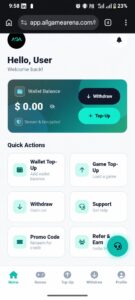
The AGA Home dashboard – wallet balance, Withdraw and Top-Up buttons, and the six Quick Actions.
- Wallet Balance card-your USD balance, with an eye icon to hide it for privacy, plus prominent Withdraw and Top-Up buttons.
- Quick Actions grid-six tappable cards: Wallet Top-Up · Game Top-Up · Withdraw · Support · Promo Code · Refer & Earn.
- Announcements-the platform’s official feed. New promos, referral boosts, and notices like “Password after reset of every game will be the same as the username for that game” appear here. Check it every few days.
- Bottom navigation-always-visible tabs: Home · Games · Top-Up · Withdraw · Profile.
- Floating Support button-the green headset icon, on almost every screen, connects you to 24/7 customer care.
Browsing Games and Requesting Credentials
Tap Games in the bottom nav to see the catalog, with two filters: All Games and Hot (the most popular titles, flagged with a red flame badge).
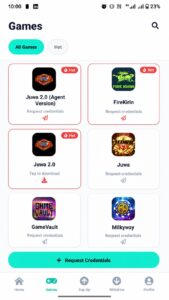
The Games tab-request credentials or download supported titles like Juwa, Fire Kirin, Game Vault and Milky Way.
Each game card shows one of two action states:
- “Tap to download”-you don’t yet have the game’s APK on your device. Tap once and AGA hands you the installer.
- “Request credentials”-you’ve already installed the game but need a login. Tap, and AGA generates a unique username and default password linked to your AGA account.
| Note: For security and simplicity, whenever an automated password reset is executed via AGA, the new game-level password defaults to match your existing game-level username string. |
Topping Up Your Wallet
AGA splits money in into two clear stages, which keeps things clean.
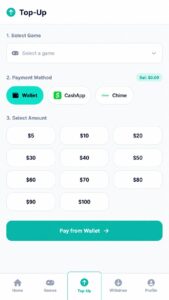
The Top-Up cashier -pick a game, choose Wallet, Cash App, or Chime, then a preset amount.
Stage 1: Wallet Top-Up (money in)
This funds your AGA master wallet. On the Top-Up screen:
- Select Game – leave blank if you’re only loading the wallet, or pick a game to top up the wallet and load it in one go.
- Payment Method – choose Wallet (pay from existing AGA balance), Cash App, or Chime. (More methods are added as players request them and processors approve them.)
- Select Amount – quick-pick buttons for $5, $10, $20, $30, $40, $50, $60, $70, $80, $90, $100.
- Tap Pay from Wallet (or the equivalent for the method you picked) and confirm.
Most deposits post automatically within seconds. In rare cases (network congestion, payment-method verification) it can take up to 24 hours, but that’s the outer edge, not the norm.
Stage 2: Game Top-Up (move funds into a game)
Once your wallet has a balance, you can load any specific game in seconds:
- From the home screen, tap Game Top-Up.
- Pick the game.
- Pick the amount.
- Confirm.
Credits land in your in-game account and you’re playing.
Cashing Out: How to Withdraw Funds in All Game Arena
Withdrawals are where the agent-free promise really pays off. When you’re ready to make an AGA withdrawal, both Cash App and Chime are fully supported for fast payouts. Tap Withdraw in the bottom nav and you’ll see three labeled options:
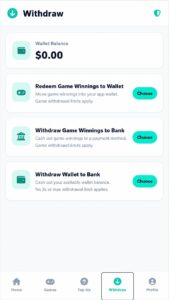
The Withdraw screen — three options, including Withdraw Wallet to Bank with no 3x or max limit.
1. Redeem Game Winnings to Wallet
Move game winnings into your app wallet. Game withdrawal limits apply.
Use this when you’ve won inside a game and want to pull the funds back into your AGA wallet. The 3x play-through requirement applies — that’s standard across sweepstakes-style games (you wager 3× your top-up before winnings become withdrawable).
2. Withdraw Game Winnings to Provided Payment Methods
Cash out game winnings to a payment method. Game withdrawal limits apply.
Same source (in-game winnings), but skips the wallet and sends straight to your linked Cash App, Chime, or bank. The same 3x rule applies.
3. Withdraw Wallet to Bank
Cash out your available wallet balance. No 3x or max withdrawal limit applies.
The smoothest option: if the funds are already in your AGA wallet (not inside a game), you can pull them out with no play-through requirement and no maximum cap. Requests can be submitted any time; actual processing speed depends on your payment method and any verification checks.
| Practical tip: If you top up your wallet but decide not to play, use option 3 to pull the funds back out cleanly. Once funds move into a game, the 3x rule kicks in. |
Maximizing Rewards: Referrals and Promo Codes
This is one of AGA’s headline programs and probably the easiest way to grow your balance without depositing more money.
From the Refer & Earn tile on the Home screen, you get:
- Your unique referral link (and a short code).
- A share button that drops it into your clipboard.
The mechanic is simple: share your link; when a friend signs up using it and makes their first top-up, both of you get rewarded. The key phrase is “and tops up” — the bonus triggers on the first deposit, not on registration. Tell friends upfront so they know to fund their wallet to unlock the reward.
Tips to maximize referrals
To maximize your referral channel earnings, consider these strategic approaches:
-
Target Active Player Groups: Share your links directly within sweepstakes communities, fish game strategy forums, and social groups where players are already using slow, manual Facebook agents.
-
Incorporate Codes into Social Bios: If you stream your gameplay or publish sweepstakes content online, place your referral link permanently within your social media bios for passive, automated sign-ups.
-
Monitor the Announcements Feed: AGA regularly hosts promotional windows where standard referral payouts are doubled or tripled for a limited time.
Redeeming Promo Codes in All Game Arena (AGA)
Next to Refer & Earn on the Home screen sits the Promo Code tile: “Redeem for credit.” Promo codes are short strings AGA hands out for:
- New-user welcome bonuses
- Seasonal promotions (holidays, sports events)
- Community giveaways
How to redeem:
- Tap Promo Code on the Home screen.
- Enter the code exactly as provided.
- Tap Apply / Redeem.
- The credit lands in your wallet immediately if the code is valid.
Security Warning: Only trust promotional voucher strings published inside the official in-app Announcements feed. Avoid third-party websites claiming to offer “infinite credit cheats,” as these are common phishing attempts.
Security: What AGA Does to Protect Your Account
AGA employs robust, enterprise-grade protocols to ensure your data and funds remain completely safe:
- Mandatory HTTPS Encryption: All communications across the app use strict transport layer security protocols to eliminate the threat of middleman data intercepts.
- Strict Content Security Policy (CSP): The application’s web interface employs strict code execution policies to entirely block cross-site scripting (XSS) actions and unauthorized code injections.
- Isolated Environment Sandboxing: Because game credentials operate independently from your core login profile, a security breach on an external game server cannot compromise your central financial wallet.
The single strongest thing you can do for your security is use a long, unique password you don’t reuse anywhere else.
AGA Pricing
There isn’t any. AGA charges:
- No sign-up fee
- No deposit fee
- No withdrawal fee
You play with what you put in.
Support: How to Get Help
Support lives in two places:
- In the app — the floating green headset icon on home screen. Available 24/7.
- Outside the app — AGA runs an active direct email line at support@allgamearena.com.
Use support for transaction issues, credential problems, promo-code rejections, account-access trouble, or anything else that doesn’t feel right.
Frequently Asked Questions
Q: What is AGA?
A: All Game Arena: a self-serve platform that lets you fund and cash out of supported sweepstakes-style games yourself, with no agents in the middle. One account covers all supported titles.
Q: Is AGA the same as Juwa or Clash Casino?
A: No. AGA is a separate gateway and wallet. You access games like Juwa 2.0, Fire Kirin, and Game Vault through AGA, but AGA isn’t the game operator.
Q: How fast are deposits credited?
A: Most post automatically the moment payment is received. In rare cases it can take up to 10 minutes.
Q: How fast are withdrawals?
A: Withdrawal requests can be submitted any time of day. How quickly the funds arrive depends on your payment method (Cash App or Chime) and whether a routine verification check applies.
Q: What payment methods are supported?
A: Currently Cash App and Chime. More are added as players request them.
Q: What’s the minimum top-up?
A: $5.
Q: Is AGA free to use?
A: Yes.
Q: Where do I find official promo codes?
A: The Announcements section on the Home screen & notifications.
Final Thoughts
AGA isn’t trying to reinvent the games themselves. Juwa, Fire Kirin, Game Vault, Milky Way, and Orion Stars are still the titles you already know. What AGA reinvents is everything around them: the wallet, the top-ups, the cash-outs, the support, and the referral economy.
If you’re already playing these games through agents, the switch mostly comes down to whether you’d rather wait for a human to reply or tap a button. For most players, that’s not a hard choice.
| A quick word on responsible play: These are real-money games. Set a budget before you start, never chase losses, and treat your wallet balance as money you’ve already spent on entertainment, not as savings. |
Ready to stop waiting on agents and take control of your winnings? Head to the official site of All Game Arena to set up your master wallet in under a minute, then top up, play, and cash out entirely on your own schedule.
Got a question that isn’t covered here? Drop it in the comments, or reach AGA support at support@allgamearena.com.